
ESP-Mosaico: บอร์ด ESP32-S31 ที่ออกแบบมาให้ AI เขียนโค้ดให้ ESP-Mosaico: the ESP32-S31 board built for AI coding agents
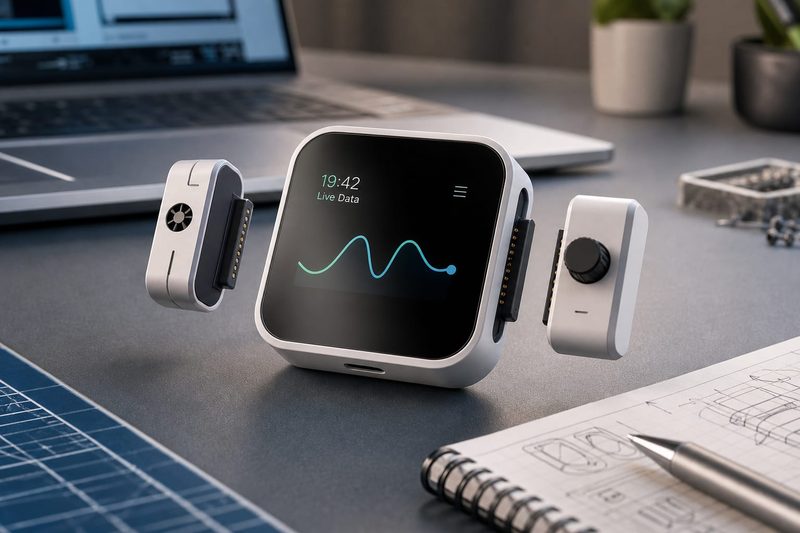
เจาะสเปก ESP-Mosaico ของ Espressif — จอ AMOLED 480×480, Wi-Fi 6, เข็มทิศสองตัวสำหรับรู้จำโมดูล และแนวคิด ChatCoding พร้อมข้อจำกัดที่ต้องรู้ก่อนซื้อ
A hardware deep dive into Espressif ESP-Mosaico: 480×480 AMOLED, Wi-Fi 6, dual magnetometers for module sensing, the ChatCoding idea and the limits to know first.
ทุกปีจะมีบอร์ดพัฒนาหน้าตาน่ารักออกมาสักตัวที่ทำให้คนในวงการ IoT ถกกันว่า "นี่ของเล่นหรือของจริง" ปีนี้เป็นคิวของ ESP-Mosaico ของ Espressif — กล่องสี่เหลี่ยมขนาดเท่าปลายนิ้ว จอสัมผัส AMOLED 480×480 ข้างในเป็น ESP32-S31 ตัวใหม่ และมีจุดขายที่ไม่เคยมีบอร์ดไหนพูดตรงๆ มาก่อน คือ ออกแบบมาให้ AI เขียนโค้ดให้
สิ่งที่อยู่ในกล่องเล็กๆ นี้
ก่อนจะพูดเรื่องแนวคิด ดูของจริงก่อน เพราะสเปกเป็นตัวบอกว่าใครควรสนใจ
| ส่วนประกอบ | ของจริงที่ใส่มา |
|---|---|
| ชิปหลัก | ESP32-S31NRV16 — RISC-V สองคอร์ 320MHz พร้อม PSRAM 16MB ในตัวชิป |
| การเชื่อมต่อ | Wi-Fi 6 (802.11ax) · Bluetooth 5.4 (LE + BR/EDR) · IEEE 802.15.4 สำหรับ Thread และ Zigbee |
| หน่วยความจำ | NOR flash 16MB + NAND flash 1Gbit (128MB) แยกอีกก้อน |
| จอ | AMOLED 480×480 ต่อผ่าน QSPI ไดรเวอร์ CO5300 ทัชสกรีน CST9220 — คู่มือฮาร์ดแวร์ระบุขนาด 2.16 นิ้ว (หน้า Board Manager ระบุแค่ 480×480) |
| เสียง | โคเดก ES8311 · แอมป์ Class-D NS4150B 3 วัตต์ · ไมค์บนบอร์ด |
| เซ็นเซอร์ | IMU 6 แกน BMI270 · เข็มทิศ BMM150 สองตัว |
| แบตเตอรี่ | ลิเธียม 3.7V 65mAh · ชาร์จผ่าน TP4057 · มีชิปวัดแบต BQ27220 |
| ขยาย | เฮดเดอร์ 2×10P ระยะ 2.54mm สองฝั่ง ซ้าย-ขวา · USB-C แบบ High-Speed OTG |
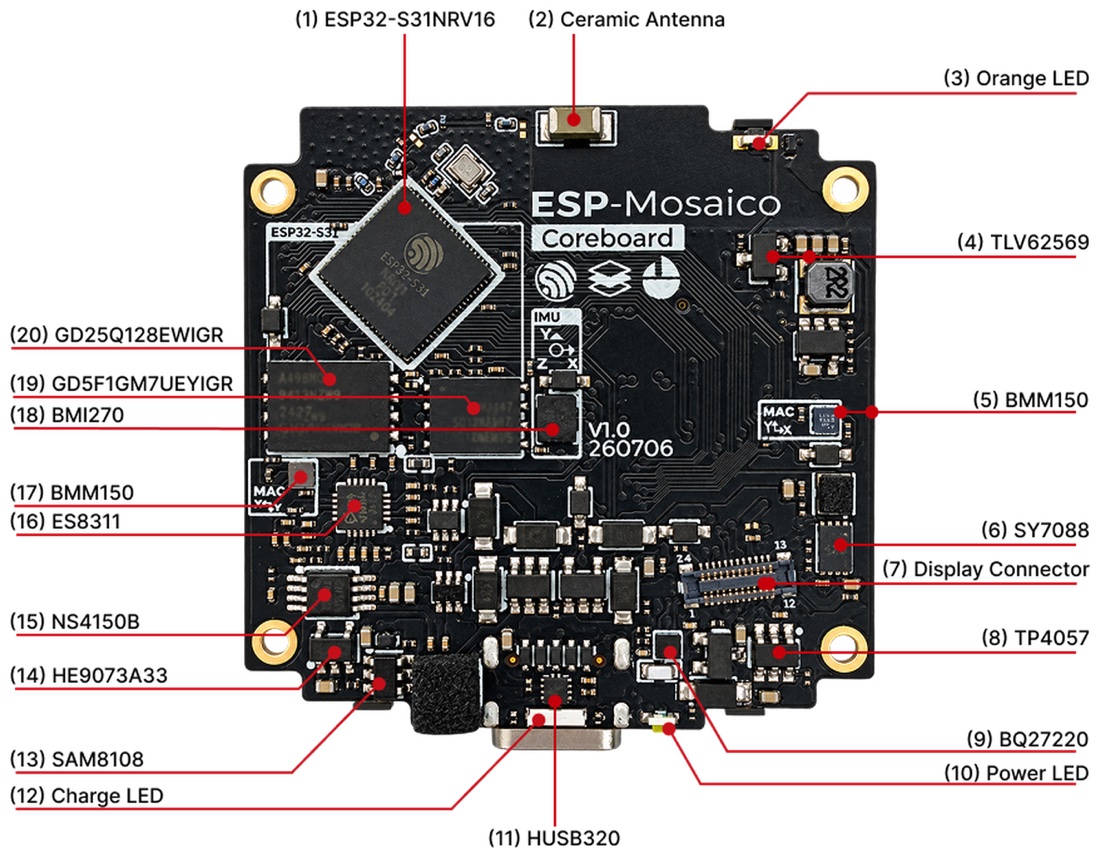
จุดที่ผมคิดว่าน่าสนใจที่สุดในตารางนี้ไม่ใช่จอหรือชิป แต่เป็น เข็มทิศสองตัว คู่มือฮาร์ดแวร์ระบุว่ามี BMM150 สองชุดจริง ที่ I2C address 0x11 กับ 0x12 แต่ไม่ได้อธิบายว่าใส่มาทำอะไร ในมุมวิศวกรรม การวางเซ็นเซอร์วัดสนามแม่เหล็กสองจุดบนบอร์ดเดียวมักทำเพื่ออ่านความต่างของสนามระหว่างสองตำแหน่ง ซึ่งใช้รับรู้การติดตั้งและทิศทางของโมดูลแม่เหล็กที่มาประกบได้ — ตรงนี้เป็นการตีความของผม ไม่ใช่คำอธิบายจาก Espressif ใครจะฟันธงต้องรอเอกสาร BSP หรือโค้ดตัวอย่างออกมาก่อน
โครงสร้างแบบสองชั้น: CoreBoard กับ BaseBoard
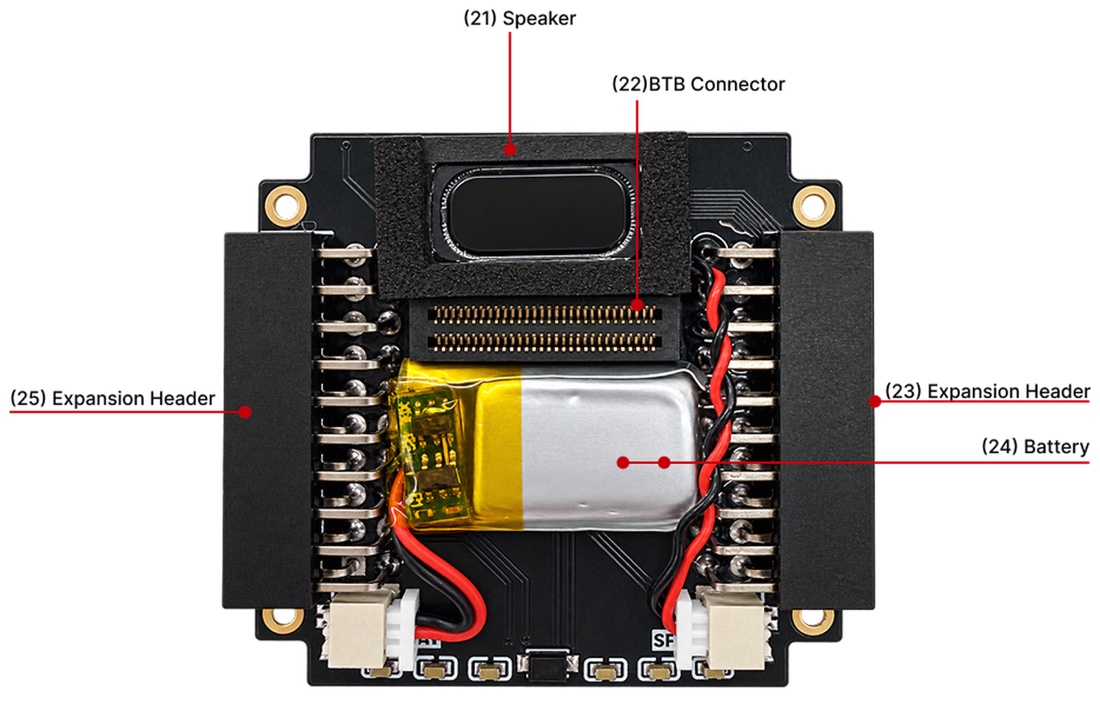
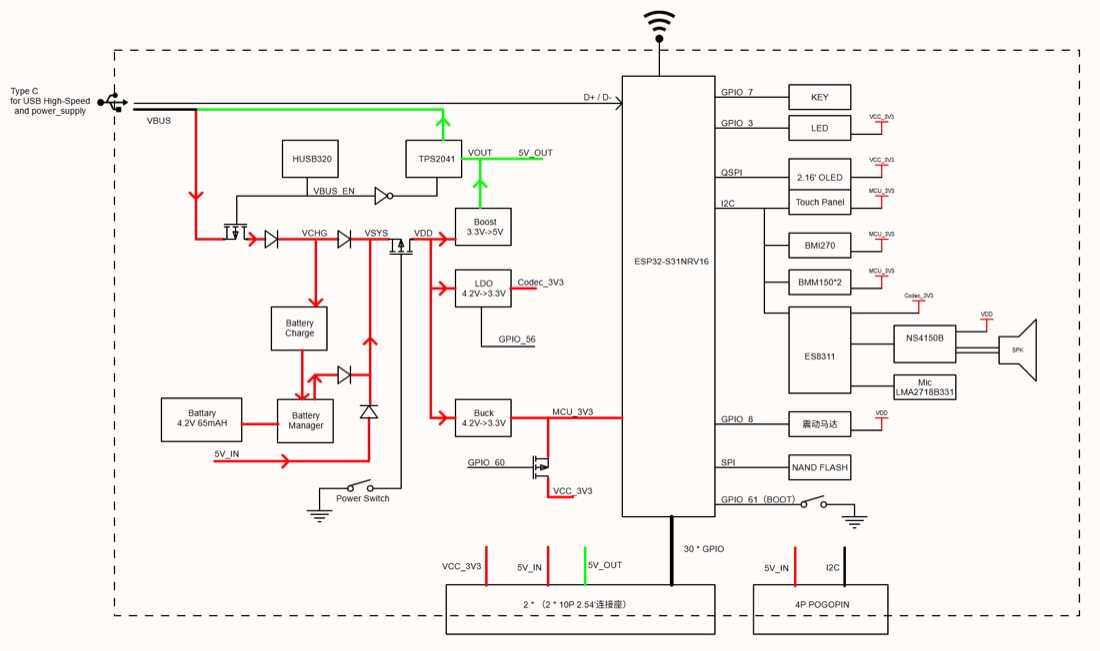
ตัวเครื่องไม่ได้เป็นแผ่นเดียว แต่แยกเป็น CoreBoard (ชิป หน่วยความจำ จอ) กับ BaseBoard (แบต ระบบจ่ายไฟ คอนเนกเตอร์) ต่อกันด้วยบอร์ดทูบอร์ด 60 ขา
การแยกแบบนี้มีความหมายสำหรับคนที่คิดจะทำสินค้าจริง: คุณออกแบบ BaseBoard ของตัวเองให้เข้ากับงาน แล้วยืมสมองจาก CoreBoard มาใช้ได้เลย ไม่ต้องออกแบบวงจรรอบชิป Wi-Fi 6 เองตั้งแต่ศูนย์ ซึ่งเป็นส่วนที่พังง่ายที่สุดสำหรับทีมที่ไม่เคยทำ RF มาก่อน
ChatCoding — ส่วนที่ใหม่จริง และส่วนที่ยังต้องพิสูจน์
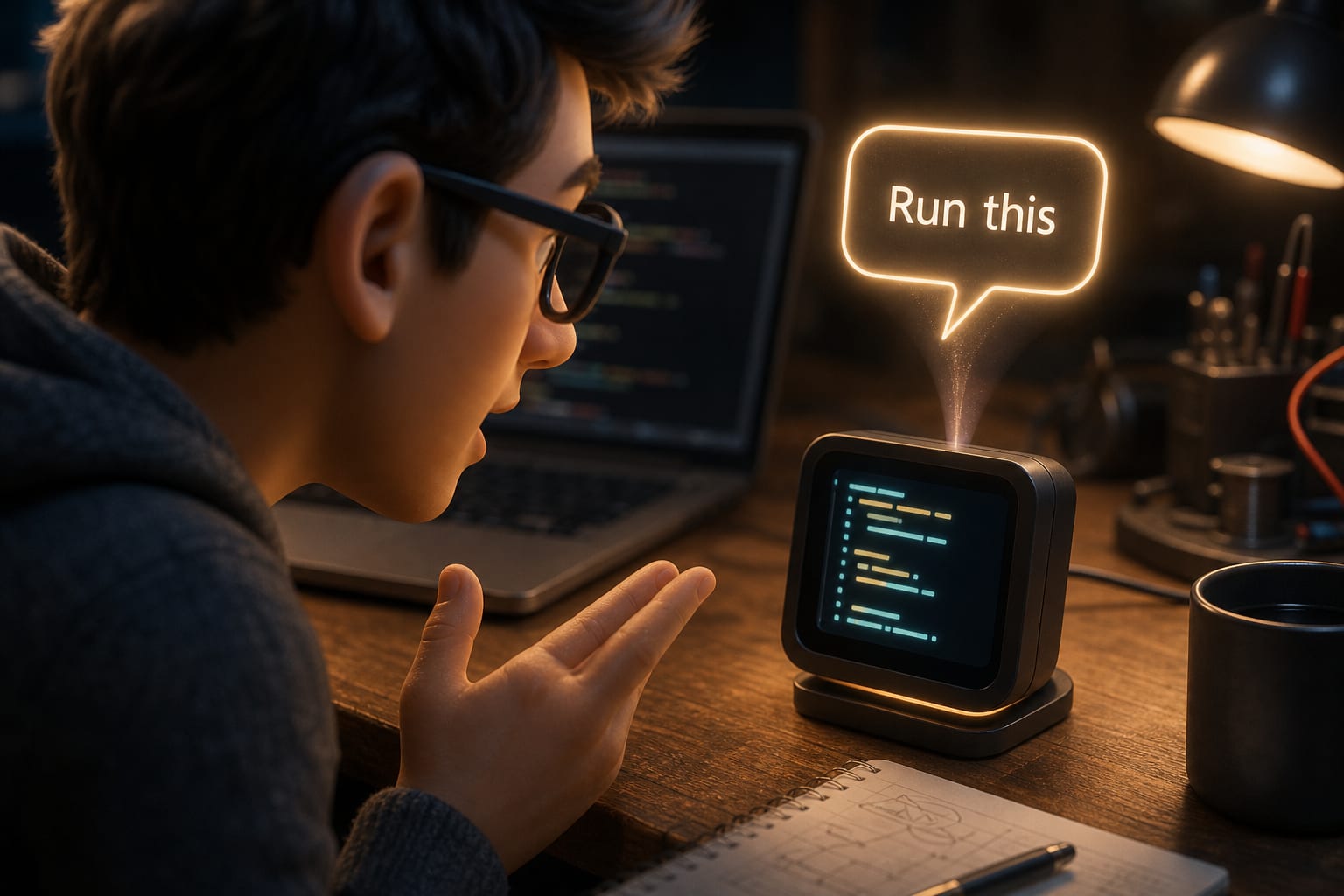
Espressif เรียกวิธีใช้งานหลักว่า ChatCoding: พูดกับอุปกรณ์เป็นภาษาคน แล้วเอเจนต์จะสร้างโค้ดและรันให้ บนเครื่องมีปุ่ม AI KEY แยกต่างหาก กดสั้นเพื่อเลื่อนเมนู กดค้างเพื่อเข้าโหมดสร้างงาน และยังมีอีกสองเส้นทางคือ VibeCoding (ใช้เอเจนต์บนคอมพิวเตอร์) กับ Idea Center (โหลดแอปสำเร็จรูปมาใช้)
ตรงนี้ต้องพูดกันตรงๆ สองเรื่อง
เรื่องแรก สิ่งที่ใหม่จริงไม่ใช่ "AI เขียนโค้ดให้" — อันนั้นใครก็ทำได้ด้วย Claude Code หรือ Cursor อยู่แล้ว สิ่งที่ใหม่คือ ฮาร์ดแวร์ถูกออกแบบให้เอเจนต์เดาถูก บอร์ดทั่วไปในตลาดมีพันแบบ ต่อเซ็นเซอร์คนละขา ใช้ไลบรารีคนละตัว เอเจนต์จึงมั่วบ่อย แต่เมื่ออุปกรณ์มีจอเดียว ไมค์เดียว เซ็นเซอร์ชุดเดียว และขาต่อขยายที่นิยามไว้ตายตัว โอกาสที่โค้ดจะรันได้จริงในครั้งแรกจะสูงขึ้นมาก นี่คือการแก้ปัญหาที่ถูกจุด
เรื่องที่สอง เอกสารยังไม่บอกว่าเบื้องหลังคือใคร หน้าคู่มือระบุเพียงว่า "อาจเชื่อมต่อกับบริการ AI ของบุคคลที่สามตามที่ผู้ใช้ตั้งค่า" ยังไม่มีรายละเอียดว่ารองรับโมเดลไหน ใช้โปรโตคอลอะไร ต่อ MCP ได้ไหม หรือคิดค่าใช้จ่ายอย่างไร สำหรับคนที่จะเอาไปใช้ในงานจริง นี่คือคำถามที่ต้องได้คำตอบก่อนตัดสินใจ เพราะมันหมายถึงต้นทุนต่อเครื่องต่อเดือน
วิดีโอทางการที่ดูประกอบได้
ณ วันที่เขียน (22 กันยายน 2569) ผมยังไม่พบวิดีโอทางการของ ESP-Mosaico โดยเฉพาะ ทั้งบนช่อง YouTube ของ Espressif และจากการค้นทั่วไป แต่มีวิดีโอทางการของชิป ESP32-S31 ที่เป็นหัวใจของบอร์ดนี้ให้ดูก่อนได้:
- ESP32-S31: Dual-Core RISC-V SoC with High-Performance Multi-Protocol Connectivity & HMI — วิดีโอแนะนำชิปอย่างเป็นทางการ
- First Look: Unboxing ESP32-S31 Dev Kits — แกะกล่องชุดพัฒนาตระกูล S31
- HMI performance test บน ESP32-S31 — ทดสอบงานกราฟิกและหน้าจอ ซึ่งเป็นงานหลักของ Mosaico
- ช่อง YouTube ทางการของ Espressif Systems — ไว้ตามดูเมื่อมีวิดีโอ Mosaico ออกมา
ข้อจำกัดที่ต้องรู้ก่อนซื้อ
แบต 65mAh คือของสำหรับโต๊ะทำงาน ไม่ใช่ของภาคสนาม ความจุนี้เล็กกว่าแบตหูฟังไร้สายข้างหนึ่ง Espressif ไม่ได้ประกาศตัวเลขระยะเวลาใช้งานจริงไว้ และเวลาที่ได้จะต่างกันมากตามความสว่างจอ ภาระซีพียู รอบการส่ง Wi-Fi และการใช้โหมดประหยัดไฟ จึงควรวัด runtime เองตามงานที่จะใช้จริง แต่ด้วยความจุระดับนี้ ควรวางแผนตั้งแต่ต้นว่าเป็นงานต้นแบบหรืองานตั้งโต๊ะที่เสียบไฟได้ ถ้าจะทำอุปกรณ์วางทิ้งไว้ ต้องต่อไฟเลี้ยงหรือออกแบบ BaseBoard ใหม่พร้อมแบตก้อนใหญ่
ขาต่อขยายฝั่งขวาใช้ร่วมกับระบบเสียง เอกสารระบุชัดว่าห้าขาบนโมดูลฝั่งขวาถูกแชร์กับบัส I2S ของโคเดก แปลว่า ถ้าจะใช้โมดูลฝั่งขวา ต้องยอมทิ้งเสียง นี่คือรายละเอียดที่คนอ่านสเปกผ่านๆ จะพลาด แล้วไปเจอเอาตอนต่อวงจรเสร็จแล้ว
กล้องต่อได้เฉพาะฝั่งซ้าย และต้องหันคอนเนกเตอร์ให้ถูกด้าน
แล้วมันเหมาะกับใคร
จากที่ไล่สเปกและเอกสารมาทั้งหมด ผมจัดกลุ่มแบบนี้
- ทีมที่ต้องทำต้นแบบให้ลูกค้าดูเร็วๆ — คุ้มที่สุด เพราะได้จอ เสียง เซ็นเซอร์ และแบตมาครบในกล่องเดียว ไม่ต้องเสียเวลาต่อสายและแก้ปัญหาไฟตก เอาไปวางบนโต๊ะประชุมได้เลย
- คนสอนและค่ายอบรม — การที่ผู้เรียนพูดว่า "ทำให้จอแสดงอุณหภูมิ" แล้วเห็นผลทันที ลดกำแพงเรื่องไวยากรณ์ภาษาโปรแกรมลงไปมาก
- งานที่ต้องผลิตจริงจำนวนมาก — ยังไม่ใช่ ใช้โมดูล ESP32-S31 เปล่าๆ แล้วออกแบบบอร์ดเองถูกกว่าและคุมต้นทุนได้ดีกว่า
- งานภาคสนามที่ใช้แบต — ไม่เหมาะ ด้วยเหตุผลเรื่องความจุแบตข้างต้น
ที่มาที่ไปและสถานะตอนนี้
สัญญาณหนึ่งที่บอกว่าบอร์ดนี้ไม่ได้มีแค่หน้าเว็บขายของ คือมันถูกบรรจุอยู่ในเครื่องมือทางการของ Espressif แล้ว ทั้งในชุดเอกสาร esp-dev-kits และมีนิยามบอร์ดใน ESP Board Manager ซึ่งแปลว่าเริ่มต้นเขียนโค้ดด้วยชุดเครื่องมือมาตรฐานได้เลย ไม่ต้องรอไลบรารีจากชุมชน
ESP32-S31 ซึ่งเป็นชิปหลักของบอร์ดนี้ Espressif ประกาศตัวเมื่อเดือนมีนาคม 2569 และเข้าสู่การผลิตจำนวนมากในเดือนกรกฎาคมปีเดียวกัน จุดเด่นคือเป็น RISC-V สองคอร์ที่ได้ Wi-Fi 6 กับ 802.15.4 มาในชิปเดียว ทำให้ทำงานร่วมกับมาตรฐาน Matter และ Thread ได้โดยไม่ต้องพึ่งชิปเสริม
ส่วนตัว ESP-Mosaico เอง ตามรายงานขายผ่าน Taobao เป็นหลัก ยังไม่มีราคาอย่างเป็นทางการประกาศบนหน้าผลิตภัณฑ์ และยังไม่เห็นช่องทางจำหน่ายในไทย ใครสนใจตอนนี้คงต้องสั่งผ่านตัวแทนนำเข้า
สรุปในมุมคนทำงาน
ESP-Mosaico ไม่ได้ชนะด้วยสเปก — ชิ้นส่วนแทบทุกอย่างในนี้หาได้จากบอร์ดอื่นในราคาที่ถูกกว่า สิ่งที่มันขายคือ การลดเวลาจากไอเดียไปถึงของที่ทำงานได้ โดยออกแบบฮาร์ดแวร์ให้แคบพอที่ AI จะเขียนโค้ดให้ถูก
ถ้าแนวคิดนี้เวิร์ก เราจะเห็นบอร์ดลักษณะนี้ตามมาอีกเยอะ และการแข่งขันจะย้ายจาก "ใครให้ขามากกว่า" ไปเป็น "ใครทำให้เอเจนต์ทำงานถูกบ่อยกว่า" ซึ่งเป็นคนละเกมกับที่วงการบอร์ดพัฒนาแข่งกันมาสิบปี
สิ่งที่ผมจะจับตาต่อคือสามเรื่อง: รายชื่อโมดูลเสริมที่จะทยอยออกมา, ความชัดเจนเรื่องบริการ AI เบื้องหลังและค่าใช้จ่าย, และราคาขายจริงเมื่อออกนอกประเทศจีน สามข้อนี้จะเป็นตัวตัดสินว่ามันจะเป็นเครื่องมือทำงาน หรือเป็นของเล่นน่ารักบนโต๊ะอีกชิ้น
ที่มา: ESP-Mosaico · คู่มือฮาร์ดแวร์ ESP-Mosaico V1.0 · ประกาศผลิตจำนวนมาก ESP32-S31 — ภาพประกอบทั้งหมดจาก Espressif Systems
Every year one cute little dev board shows up and gets the IoT crowd arguing about whether it is a toy or a tool. This year it is Espressif's ESP-Mosaico — a fingertip-sized square with a 480×480 AMOLED touch display, the new ESP32-S31 inside, and a pitch no board has made this bluntly before: it is designed to be programmed by an AI agent.
What is actually inside
| Part | What you get |
|---|---|
| SoC | ESP32-S31NRV16 — dual-core RISC-V at 320 MHz with 16 MB in-package PSRAM |
| Radios | Wi-Fi 6 (802.11ax) · Bluetooth 5.4 (LE + BR/EDR) · IEEE 802.15.4 for Thread and Zigbee |
| Storage | 16 MB NOR flash plus a separate 1 Gbit (128 MB) SPI NAND |
| Display | 480×480 AMOLED over QSPI, CO5300 driver, CST9220 touch — the hardware guide gives 2.16 inches (the Board Manager page lists only 480×480) |
| Audio | ES8311 codec · NS4150B 3 W class-D amplifier · onboard microphone |
| Sensors | BMI270 6-axis IMU · two BMM150 magnetometers |
| Battery | 3.7 V 65 mAh Li-ion · TP4057 charger · BQ27220 fuel gauge |
| Expansion | Two 2×10P headers at 2.54 mm pitch, left and right · USB-C high-speed OTG |
The most telling line in that table is not the display or the SoC — it is the pair of magnetometers. The hardware guide confirms two BMM150s at I2C 0x11 and 0x12, but it does not say what they are for. Reading it as an engineer, two magnetometers on one board usually exist to measure the difference in field between two points, which is a practical way to sense that a magnetic module has been attached and in which orientation — but that is my inference, not an Espressif statement. The BSP and example code will settle it.
Two-layer design: CoreBoard and BaseBoard
The unit is not one PCB. A CoreBoard (SoC, memory, display) mates with a BaseBoard (battery, power tree, connectors) over a 60-pin connector.
That split matters if you are thinking about a product rather than a demo: design your own BaseBoard for the job and borrow the brain. You skip the RF layout around a Wi-Fi 6 part, which is exactly where teams without RF experience lose weeks.
ChatCoding: what is genuinely new, and what still has to be proven
Espressif calls the main workflow ChatCoding: talk to the device in plain language and an agent writes and runs the code. There is a dedicated AI KEY — short press to move through the menu, long press to open the create mode — plus two other routes: VibeCoding (an agent on your desktop) and an Idea Center of ready-made apps.
Two honest observations.
First, the new part is not "AI writes your code." Anyone can already do that with Claude Code or Cursor. The new part is that the hardware is shaped so the agent can guess right. Generic boards come in a thousand variants with different pinouts and libraries, so agents hallucinate. When there is exactly one display, one microphone, one sensor set and a fixed expansion pinout, first-run success goes up sharply. That is the correct problem to attack.
Second, the documentation does not say what is behind the curtain. The guide only notes that the device "may connect to third-party AI services configured by users" — no word on which models, which protocol, whether MCP is supported, or who pays for the tokens. For anyone planning to ship this, that is the question to settle first, because it decides your per-device running cost.
Official videos worth watching
As of 22 September 2026 I could not find an official video dedicated to ESP-Mosaico, either on Espressif's YouTube channel or in a general search. The official material on the ESP32-S31 at its core is the next best thing:
- ESP32-S31: Dual-Core RISC-V SoC with High-Performance Multi-Protocol Connectivity & HMI — the official chip introduction
- First Look: Unboxing ESP32-S31 Dev Kits
- HMI performance test on the ESP32-S31 — graphics and display work, exactly what Mosaico is built around
- Espressif Systems on YouTube — watch here for a Mosaico video when it lands
Limits worth knowing before you buy
65 mAh is a desk battery, not a field battery. That is less than one side of a pair of wireless earbuds. Espressif publishes no runtime figure, and real endurance swings widely with screen brightness, CPU load, Wi-Fi duty cycle and sleep strategy, so measure it against your own workload. At this capacity, plan for a prototype or a mains-powered desk device; anything left running on a shelf needs external power or your own BaseBoard with a real cell.
The right-hand expansion shares pins with the audio bus. The hardware guide is explicit: five pins on the right module are multiplexed with the codec's I2S bus, so using a right-side module means giving up audio. That detail is easy to skim past and painful to discover after the wiring is done.
The camera module only fits the left slot, in one connector orientation.
Who it is for
- Teams that need a client-facing prototype this week — the best fit. Display, audio, sensors and power in one shell; nothing to wire, no brown-outs to debug.
- Teaching and workshops — a learner says "show the temperature on screen" and sees it happen, which removes a large syntax barrier.
- Volume production — not yet. A bare ESP32-S31 module on your own PCB will be cheaper and easier to control.
- Battery-powered field devices — no, for the reason above.
Context and current status
One sign this is more than a marketing page: the board is already carried by Espressif's own tooling — it ships in the esp-dev-kits documentation set and has a board definition in ESP Board Manager, so you can start with the standard toolchain instead of waiting for community libraries.
The ESP32-S31 at its heart was announced in March 2026 and reached mass production in July 2026. It is a dual-core RISC-V part that carries Wi-Fi 6 and 802.15.4 on one die, so Matter and Thread work without a companion radio.
ESP-Mosaico itself is, according to the product page, sold mainly through Taobao. No official price is published on the site and there is no Thai distribution channel yet, so buying one here means going through an importer.
The practitioner's verdict
ESP-Mosaico does not win on specifications — almost every component here exists on a cheaper board. What it sells is time from idea to something that runs, achieved by narrowing the hardware until an AI agent can target it reliably.
If the idea works, expect a wave of boards like it, and expect the competition to shift from "who exposes more pins" to "whose agent gets it right more often." That is a different game from the one dev boards have been playing for a decade.
Three things to watch: the expansion module line-up as it appears, clarity on the AI backend and its cost, and the real price once it leaves China. Those decide whether this is a working tool or another charming object on the desk.
Sources: ESP-Mosaico · ESP-Mosaico V1.0 hardware guide · ESP32-S31 mass production announcement — all images courtesy of Espressif Systems
ที่มา:Source: mosaico.espressif.com/
เกี่ยวกับผู้เผยแพร่About the publisher
- ผู้เขียนAuthor
- Oneable Team
- บริษัทCompany
- Oneable — AI-Powered Software Development Agency
- ความเชี่ยวชาญExpertise
- LLM & RAG, AI Agent, Web/Mobile, MLOps
- ติดต่อContact
- www.oneable.co.th/contact
บทความที่เกี่ยวข้องRelated articles
Oneable เปิดตัว Pentora OS ระบบปฏิบัติการสำหรับอุปกรณ์ ESP32 Oneable Unveils Pentora OS, an Operating System for ESP32 Devices

เพิ่มความเร็วในการพัฒนาด้วย Kiro CLI Boost Development Speed with Kiro CLI

Deno เข้าร่วม Cloudflare: การเปลี่ยนแปลงใหม่ Deno Joins Cloudflare: A New Era of Change

Anthropic เปิดตัวบริการสแกนความปลอดภัย AI ฟรีสำหรับโครงการโอเพ่นซอร์ส Anthropic's Free AI Security Scans: Impact on Open Source

AI เพิ่งสร้างทรัพยากรในคลาวด์ ใครคือเจ้าของ? AI-Provisioned Cloud Resources: Ownership Dilemma

AI กับการเพิ่มผลิตภาพในที่ทำงาน Boosting Workplace Productivity with AI

 QR สำหรับเพิ่มเพื่อนใน LINE